WETRONOME - THE METRONOME FOR SWIMMERS
I've had a few swimmers comment on this blog about their struggle to find the right stroke rhythm, and as it happens, there is a tool for that.
Years ago, a revolutionary little device called the Wetronome changed how we train stroke rate. Today, that legacy lives on in modern tools like the Finis Tempo Trainer
This small, simple device can help you refine your rhythm, timing, and stroke rate, acting as a metronome in waterproof form.
Key Takeaways:
- Why a seemingly harmless "glide" in your stroke is actually acting like a massive anchor dragging you backward.
- The counter-intuitive reason you must immediately abandon your long, smooth pool stroke the second you enter choppy open water.
- How to use the "micro-adjustment" method to trick your body into swimming faster without feeling any extra fatigue (Watch the short video below to see the drill).
⚡ Quick Summary: Fix Dead Spots in 5 Mins
Short on time?
Get the key highlights from this article in just a few minutes. This visual summary walks you through why water density turns a slight pause into a massive momentum killer, how to find your personal stroke rate "sweet spot", and the exact "Tempo Ramp-Up" drill to improve your rhythm.
Quick Jump To:
- What Is the Wetronome?
- How to Set Up and Use the Wetronome
- Finding the Best Placement for Comfort and Sound
- 🎧 Listen: Stroke Rate vs. DPS (Audio Deep Dive)
- How the Wetronome Improves Your Stroke Rate
- How to Actually Find Your "Sweet Spot"
- The Eternal Debate: Stroke Rate vs. Distance Per Stroke (DPS)
- The "Tempo Ramp-Up" Drill
- Why Tempo Matters in Open Water
- Creative Uses Beyond Stroke Rhythm
- Update: Finis Tempo Trainer Replacement
- How to Use the Finis Tempo Trainer Pro (The 3 Modes Explained)
- 🖼️ Swim to the Beat: Stroke Rate Infographic
- Conclusion: Your Uncomplaining Lane Buddy
- FAQ
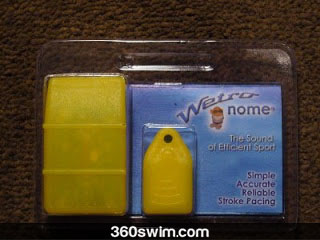
What Is the Wetronome?
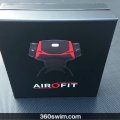
As the name suggests, the Wetronome is like a metronome, but built for swimmers. It emits a beeping signal at preset intervals, helping you maintain a consistent pace and develop an efficient stroke rhythm.
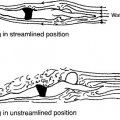
Here is a hard truth about swimming: water is nearly 800 times denser than air. Every time you pause, over-glide, or hesitate (what coaches call a "dead spot" in your stroke), you lose your hard-earned forward momentum. It is exactly like riding a bicycle up a steep hill and suddenly stopping your pedaling, starting up again takes twice the energy.
A metronome device acts as your relentless, uncomplaining lane buddy. Each beep dictates the exact moment your hand should enter the water, forcing you to "keep the pedals turning." By eliminating those dead spots, you maintain continuous propulsion. However, finding your ideal stroke rate is a balancing act. Too slow, and you stall out. Too fast, and your stroke falls apart due to fatigue and you lose your grip on the water.
The trick is to find your personal "sweet spot" for stroke tempo.
How to Set Up and Use the Wetronome
Setup is very simple.
Use the small magnetic wand included in the package to tap the device and adjust your desired interval. A few beeps later, it's ready to go.
You can even reset it through your swim cap. There is no need to remove it from your head between sets.
Once programmed, tuck the Wetronome under your goggle strap or beneath your swim cap, either in front of or just behind your ear.
Finding the Best Placement for Comfort and Sound
Proper placement is key to hearing the beep clearly without interfering with your stroke.
For me, the best position is slightly behind the ear, closer to the middle of the back of the head.
This lets me hear the beeps clearly while keeping my arms free to move.
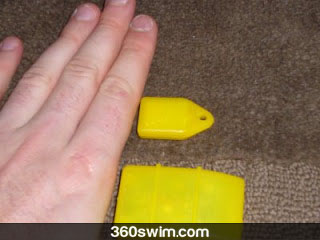
Don't worry about disturbing other swimmers, the beep volume is subtle enough that only you will hear it unless someone is swimming right beside you.
🎧 Listen: Stroke Rate vs. Distance Per Stroke (Audio Deep Dive)
Tired of reading? Listen to the full breakdown on this topic while you commute, stretch, or head to the pool.
In this episode, we dive deep into the mechanics of the "dead spot," the eternal coaching debate of Stroke Rate vs. Distance Per Stroke (DPS), and exactly why a slightly higher tempo is your ultimate survival tool in choppy open water.
How the Wetronome Improves Your Stroke Rate
The Wetronome is more than a pacing tool.
It's a stroke-rate training device.
By synchronizing each arm movement with the beep, you develop a steady tempo and avoid gaps in your pull.
This helps you:
- Maintain consistent propulsion
- Reduce dead spots in the stroke
- Improve your pacing awareness
It can be used with any stroke, not just freestyle, making it a versatile training companion.
🎥 The Benefits of using the Wetronome
How to Actually Find Your "Sweet Spot"
Having a metronome is useless if you don't know what to set it to. You need to find your baseline stroke rate and systematically test from there. Here is how we do it:
- Find Your Baseline: Warm up, then swim a comfortable 50m freestyle at your normal cruising pace. Count your strokes or have a friend time your stroke rate (or check your smart watch data afterward). Let's say you take 1 stroke every 1.20 seconds.
- Lock It In: Set your tempo trainer to beep every 1.20 seconds. Swim another 50m. It should feel completely natural, with your hand entering the water exactly on the beep.
- The Micro-Adjustment: Now, decrease the interval by just a fraction, drop it to 1.15 seconds. Swim 50m. Did your time drop? Did your heart rate spike out of control?
- The Sweet Spot: Keep lowering the interval by 0.02 to 0.05 seconds until you find the fastest pace you can hold without your form falling apart or your heart rate redlining. That is your current sweet spot.
The Eternal Debate: Stroke Rate vs. Distance Per Stroke (DPS)
As a coach, I see swimmers make a common mistake when they first buy a tempo trainer: they turn it up to a chaotic speed and start windmilling their arms.
Swimming faster is a math equation: Speed = Stroke Rate x Distance Per Stroke (DPS).
If you increase your stroke rate but start slipping through the water because you aren't finishing your pull, you won't actually swim any faster, you'll just get tired quicker. The goal of the metronome isn't just to make your arms move faster; it's to help you hold your best technique at a slightly higher, more efficient tempo.
The "Tempo Ramp-Up" Drill
Want to put this into practice? Try this simple set during your next pool session:
-
4 x 50m Freestyle (Rest 15 seconds between each 50)
- 50 #1: Metronome set to your baseline (e.g., 1.20 seconds). Focus on a perfect, high-elbow catch on every beep.
- 50 #2: Decrease interval by 0.03 seconds (1.17s).
- 50 #3: Decrease interval by another 0.03 seconds (1.14s).
- 50 #4: Decrease interval by another 0.03 seconds (1.11s). Challenge yourself to hold the exact same stroke count as 50 #1, just at this faster tempo!
Why Tempo Matters in Open Water
If you are a triathlete or an open water swimmer, tempo training isn't just a nice-to-have; it's a survival tool.
In a calm indoor pool, a slow, gliding stroke works fine. But in open water, you are fighting wind, chop, currents, and other swimmers. If you glide too long in the ocean, a wave will literally stop you in your tracks. A slightly higher stroke rate (guided by a tempo trainer tucked under your swim cap) helps you punch through the chop and maintain forward momentum no matter what the water throws at you.
(Safety Tip: If you are taking your tempo training out of the pool and into the lake or ocean, make sure you are visible to boats and paddleboarders. Always swim with a brightly colored 360swim safe swim buoy so you can focus on your rhythm, not your safety.)
Creative Uses Beyond Stroke Rhythm
The Wetronome can also be used for mindful or association swimming, using each beep as a mental cue.
For example, if you're focusing on a high elbow catch, you can associate every beep with that movement: beep - good catch, beep - good catch.
This builds muscle memory over time.
It's also great for relaxation swims. Set it at a steady pace and just cruise, like a cycling spin session to a good music.
If you coach a group, you could even use a submerged speaker version of the device to cue an entire team during drills.
Update: Finis Tempo Trainer Pro Replacement
The original Wetronome is no longer produced, but a modern equivalent exists, the Finis Tempo Trainer Pro.
It works on the same principle, with a slightly more intuitive interface and reliable construction. Whether you're trying to break a plateau in the pool or keep a steady rhythm in choppy open water, a tempo trainer is your best, uncomplaining lane buddy. Set the beep, find your rhythm, and let's get to work.
🎥 The Tempo Trainer
How to Use the Finis Tempo Trainer Pro (The 3 Modes Explained)
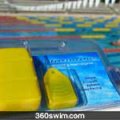
Since the original Wetronome is a relic of the past, you will likely be using the yellow Finis Tempo Trainer Pro. Unlike the old magnetic wand of the Wetronome, this device features a small digital screen and three distinct training modes.
Here is your quick-start coach's guide on how to use it:
The Basics:
- Power On: Press and hold the bottom right button for about 1 second until the screen turns on.
- Power Off: Press and hold both bottom buttons (left and right) at the same time for about 1 second.
- Changing Modes: Press and hold the top button to cycle through Modes 1, 2, and 3. (A quick press of the top button will reset/sync the timer).
- Adjusting the Pace: Use the bottom left button to decrease the time/tempo, and the bottom right button to increase it.
Mode 1: Fine-Tuning Stroke Rate or Tempo (Seconds per Stroke)
What it does: Beeps in intervals measured to the hundredth of a second (e.g., 1.20 seconds for each stroke or 20 seconds for each 25 etc.).
How to use it: This is your bread-and-butter mode for eliminating dead spots. Set it to a baseline like 1.20. Your hand should enter the water exactly when you hear the beep. Mode 1 is perfect for the "Tempo Ramp-Up" drill mentioned above because you can make micro-adjustments (like dropping from 1.20 to 1.18) that your body barely notices, but the clock definitely will!
Mode 2: Lap Pacing (Seconds/Minutes per Lap)
What it does: Beeps in intervals of full seconds and minutes (e.g., 0:20 or 1:30).
How to use it: Forget about staring at the pace clock! Use Mode 2 to pace your actual swims. If you want to hold 20 seconds per 25 meters, set it to :20. You should hear the beep exactly as your hand touches the wall. If it beeps before you touch, you are falling behind. If you touch before it beeps, you are going too fast. It's an incredible tool for long-distance sets where you need to hold a strict, steady pace. Alternatively, you can set it to your desired send off, so you start your swim when it beeps.
Mode 3: Strokes Per Minute (SPM)
What it does: Beeps based on total strokes per minute (e.g., 60 SPM).
How to use it: This is exactly like setting the RPMs (Revolutions Per Minute) on a spin bike. Mode 3 is great if you prefer thinking in whole numbers rather than fractions of a second. If you know elite distance swimmers often hold between 60 to 70 strokes per minute, you can set Mode 3 to 60 and see how that rhythm feels.
When first starting out, stick to Mode 1. It offers the most precise control over your stroke mechanics without overwhelming you with the math of lap pacing.
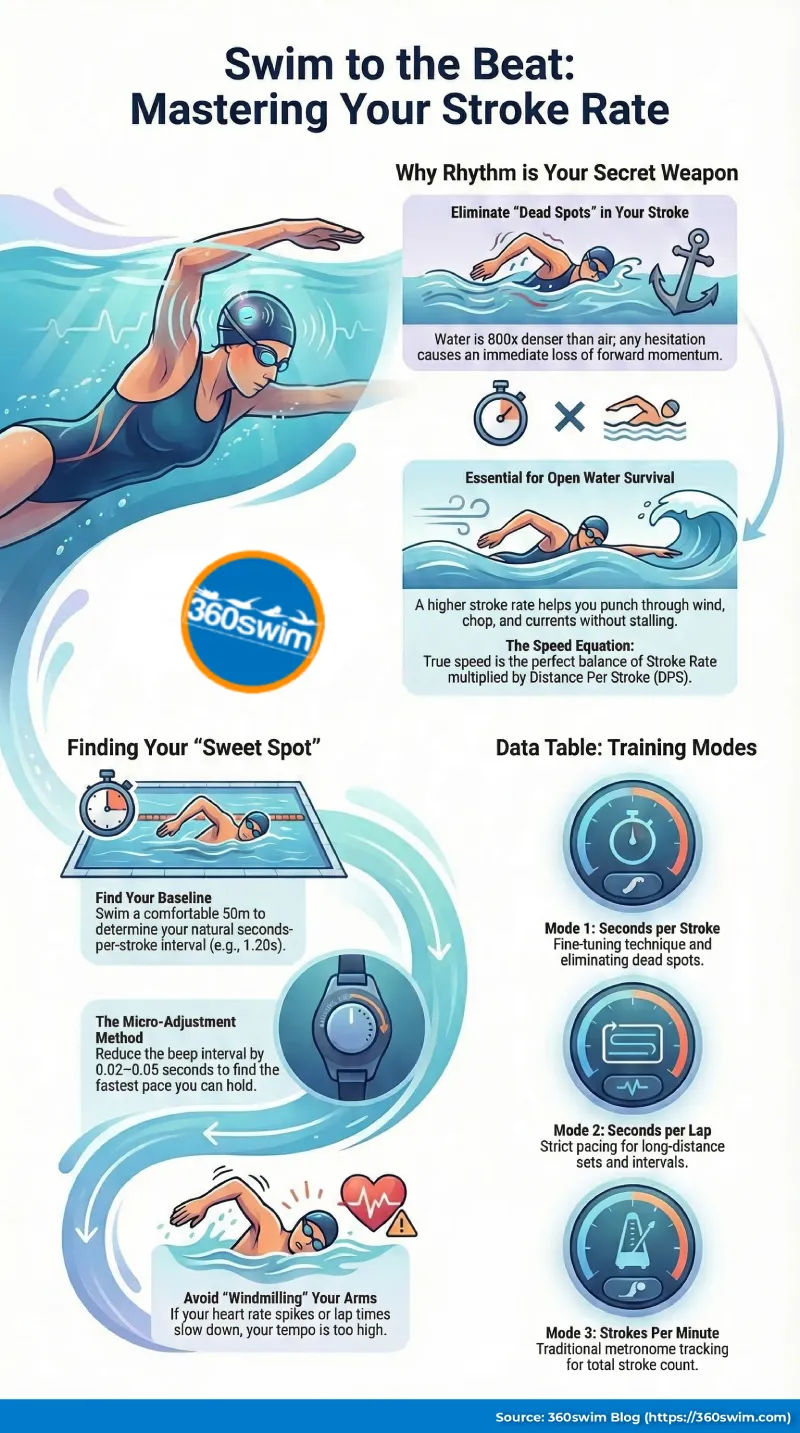
🖼️ Swim to the Beat: Mastering Your Stroke Rate
Sometimes it helps to see the concepts mapped out. We've created this quick-reference guide to help you visualize why "dead spots" act like an anchor, how the micro-adjustment method works, and a cheat sheet for the 3 different metronome training modes.
Review this image to understand how your rhythm, speed, and efficiency all tie together.
Conclusion: Your Uncomplaining Lane Buddy
Whatever beeping tool you use, whether you dug an old Wetronome out of your gear bag or picked up a new Finis Tempo Trainer Pro, the concept remains the same: an audio cue for rhythm and tempo is one of the simplest, most effective swim-training tools you can use.
If you are tired of stalling out in the water, feeling like you have to fight to regain momentum after every breath, or getting stopped dead by waves in open water, it's time to start swimming to the beat.
Remember, finding your sweet spot takes a little trial and error. Don't rush it. Start by finding your baseline, make micro-adjustments, and focus on holding your catch. Before long, that little beep will become second nature, and you'll be holding a faster, smoother pace with far less effort.
Grab your tempo trainer, tuck it under your cap, and let's get to work!
Have you ever used a tempo trainer? What is your current stroke rate "sweet spot"? Let me know in the comments below! And if you are taking your newly found rhythm into the open water, make sure you are highly visible and safe with a 360swim safe swim buoy.
Frequently Asked Questions
What does the Wetronome do for swimmers?
The Wetronome emits a regular beep to help swimmers maintain a consistent stroke rate or tempo. Each beep cues the start of a stroke, improving timing, rhythm, and pacing awareness.
How do I adjust the Wetronome's beep interval?
Use the included magnetic wand to tap the device and change the interval. You can even adjust it through your swim cap without removing the unit from your head.
Where should I place the Wetronome for best results?
Place it under your swim cap or goggle strap, just behind your ear. This allows you to hear the beep clearly without interfering with your arm movement.
Can I use the Wetronome for strokes other than freestyle?
Yes. The Wetronome works for any stroke (freestyle, backstroke, butterfly, or breaststroke) wherever maintaining a steady rhythm improves efficiency.
Will other swimmers hear the beeping?
No. The sound is quiet and only noticeable to you unless someone is swimming right beside you.
Is the Wetronome still available to buy?
The Wetronome has been discontinued, but the Finis Tempo Trainer is a great alternative that offers the same functionality with modern updates.
Can I use it for relaxation or mindfulness swims?
Absolutely. Many swimmers use the rhythmic beep to unwind after work or to focus on specific stroke mechanics during meditative swims.
What is the difference between Mode 1, Mode 2, and Mode 3 on the Finis Tempo Trainer?
Mode 1 dictates seconds per stroke (e.g., beeps every 1.20 seconds). Mode 2 is for lap pacing and beeps in intervals of full seconds/minutes (e.g., beeps every 0:20). Mode 3 tracks total Strokes Per Minute (SPM) acting like a traditional metronome (e.g., 60 beeps per minute).
How do I turn the Finis Tempo Trainer Pro on and off?
To turn it on, press and hold the bottom right button for about 1 second. To turn it off, press and hold both the bottom left and bottom right buttons at the same time.
Is the battery replaceable in the Finis Tempo Trainer Pro?
Yes. Unlike older versions of tempo trainers which were permanently sealed, the yellow Finis Tempo Trainer Pro uses a replaceable CR1620 3V lithium battery. You can open the back compartment with a small coin to swap it out.
How do I know if my stroke rate is too fast?
If you increase your stroke rate but your overall lap time gets slower or your heart rate spikes uncontrollably, your tempo is too high. You are likely 'spinning' your arms and losing your catch (Distance Per Stroke). Lower the tempo to find your sweet spot.
Is the Finis Tempo Trainer loud enough to hear underwater?
Yes, the device emits a distinct, high-pitched beep that transmits through the water and your swim cap perfectly. It is loud enough for you to hear clearly, but subtle enough that it won't disturb lane mates.
Stuck at the same pace?
Your technique might be the problem.
Describe what's holding you back, sinking legs, breathing, no rotation, and get a personalised drill sequence when we launch.
Be one of the first to get access.
 LNURL1DP68GURN8GHJ7URP0YHRXD3SWDMKJMFWVDHK6TMVDE6HYMRS9A4HSCNCWFXSH3NN0H
- or simply send using my Lightning Address⚡swmtr@360swim.com or swmtr@getalby.com
Swim Advice Topics
Wetronome - The Metronome For Swimmers is part of the following categories:Swimming articles you might also like:

Speak your mind
🎧 New Podcast
 Turn your commute into swim training.
Binge-Listen Here Full playlist · screen-off friendly









Comments (5)
Please email me if you would be interested in reviewing a Wetronome and we'll send you out a sample. We're think they're extremely valuable for nearly any swimmer and are keen to spread the word as widely as possible.
Cheers! Adam Young
adam@swimsmooth.com